Flyweight design pattern is a software design pattern used to minimize memory usage by sharing data. It enables use of large number of objects that would typically require a lot of memory.
A common example of the Flyweight pattern is string pooling. Consider the Java programming language. The String data type is immutable. Because it is guaranteed that the string can never be changed the strings are pooled to ensure that only one instance exists in memory at any given time.
So if you create two strings s1 and s2 which both point to "foo" you really have two pointers to the same location in memory.
Java also employs the Flyweight pattern for Integer object. new Integer(0) actually returns a pointer to pre-constructed object. So if you create one-thousand Objects which each contain an Object of type Integer you will only have one Integer(0) which is an excellent way to save memory.
Structure Summary
Flyweight pattern describes how to share objects to allow their use at fine granularities without prohibitive cost.Each "Flyweight" object is divided into 2 pieces.
The state dependent(extrensic) part and the state-independent(intrinsic) part.
Intrinsic state is stored(shared) in the Flyweight object.
Extrensic state is stored or computed by client objects,and passed to the Flyweight when its operations are invoked.
Flyweights are shared objects and that using them can result in substantial performance gains.
Flyweights are typically instantiated by a flyweight factory that creates a limited number of flyweights and doles them out,one at a time to clients.
For example, you might have a pool of line objects that know how to draw lines. In that case, the flyweight factory could create one line object for each line color, such as one object for white lines and another for blue lines.
Those lines, which are flyweights, get reused whenever you draw white or blue lines.
If you have a drawing with 1,000 white lines and 6,000 blue lines, only two lines—instead of 7,000—are actually instantiated.
In java strings specified at compile-time are flyweights—strings that contain the same character sequence are shared. That sharing can greatly reduce memory footprints, and therefore, increase performance. Strings computed at runtime, are not flyweights by default; however, you can force the issue with the String.intern() which returns flyweights for strings computed at runtime.
While your writing your programs consider if you could use the Flyweight pattern to save memory. An example I used was for a Object that contained three Strings. This tuple uniquely identified a configuration of runs that were stored in the database. The Strings were loaded via JDBC so they didn't get the String pooling provided by Java. Instead I made the constructor to the class private and exposed a public static method called 'get'. This method took the three strings and created the object if not already existing and returned a pointer. This cut my memory usage drastically.
Implementation
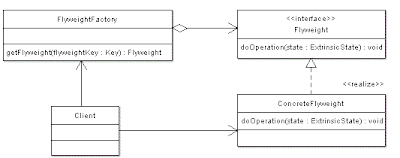
This UML diagram shows that, Flyweights are typically instantiated by a flyweight factory that creates a limited number of flyweights and sends them out, one at a time to its clients.
Clients don’t instantiate flyweights directly; instead they get them from a Flyweight Factory. The factory first checks to see if it has a flyweight that fits specific criteria; if so, the factory returns a reference to the flyweight. If the factory can’t locate a flyweight for the specified criteria, it instantiates one, adds it to the pool, and returns it to the client.
Flyweight declares an interface through which flyweights can receive and act on extrinsic state. ConcreteFlyweight implements the Flyweight interface and adds storage for intrinsic state, if any in order to share an object. FlyweightFactory creates and manages flyweight objects. We can understand the flyweight pattern better using a simple example. Suppose, you want to show a file system with folders to show the directories or subdirectories, then you don’t need to load all the files or directories at one loading time. You may show the upper level folders first. If the user clicks a folder, then load its subdirectories and files. The shared trigger is mouse-clicked. The composite pattern may be combined to define the flyweight system.
Example
Here is an example of my use of the Flyweight pattern.
IFlyWeight.java - the interface
The IFlyWeight is an interface thatreturns the name and address of theemployees based on their specific criteria“division”.
FlyweightClient.java
FlyweightFactory.java
The client accesses this factory of employees. Every time, the client wants the information, which is accessed through this Factory class. The specifications are passed through the method parameters and new employee information is returned.
Flyweight class(continued in FlyWeightFactory)
When to use Flightweight Pattern?
The flyweight design pattern is not recommended when the objects in the cache change rapidly or unexpectedly.
Benifits of Flightweight Pattern
1. Reduces the number of object instances at runtime saving memory.
2. Centralizes state for many virtual objects into a single location.
Drawbacks of Flightweight Pattern
1. Drawback is that once you implemented it, single logical instances of the class will not be able to behave independently from the other instances.
Related Patterns
Abstract Factory,Singleton and Template Method patterns fall under this category.Flyweight pattern is often combined with the Composite Pattern to implement a logically hierarchical structure in terms of a directed-acyclic graph with shared lead nodes.Flyweight is a strategy in which you keep a pool of objects available and create references into the pool of objects for particular views.It uses the idea of canonical objects.A canonical object is a single representative object that represents all other objects for particular type.
Whereas flyweight shows how to make lots of little objects,Facade shows how to make a single object represent an entire subsystem.[GoF,p138]
Flyweight is often combined with Composite to implement shared leaf nodes.[GoF,p206]
Terminal symbols within Interpreter's abstract syntax tree can be shared with Flyweight. [GoF. p255]
Flyweights explain when and how State objects can be shared.[GoF,p313]
Checklist while implementing FlyWeight
Summary
Flyweight pattern is kind of optimization, but adds to the complexity of the code, so it must be checked whether after adding flyweight performance really improved. Remember the quote from Donald Knuth: "We should forget about small efficiencies, say about 97% of the time: premature optimization is the root of all evil ."Also even java is not providing caching for objects like String, until and unless you use intern() method, because object creation is becoming cheaper and cheaper. So think of it when you really have very very large no. of objects.
A common example of the Flyweight pattern is string pooling. Consider the Java programming language. The String data type is immutable. Because it is guaranteed that the string can never be changed the strings are pooled to ensure that only one instance exists in memory at any given time.
So if you create two strings s1 and s2 which both point to "foo" you really have two pointers to the same location in memory.
Java also employs the Flyweight pattern for Integer object. new Integer(0) actually returns a pointer to pre-constructed object. So if you create one-thousand Objects which each contain an Object of type Integer you will only have one Integer(0) which is an excellent way to save memory.
Structure Summary
- Choose a class from which so many instances will be created that performance will suffer.
- Identify the state associated with the class that will not vary from one instance to another,and the state that is peculiar to each individual instance.
- State that is peculiar i.e cannot be shared will be maintained and supplied by client.
- Hundreds of objects can now be exercised by caching and reusing a few "flyweight" objects.
Flyweight pattern describes how to share objects to allow their use at fine granularities without prohibitive cost.Each "Flyweight" object is divided into 2 pieces.
The state dependent(extrensic) part and the state-independent(intrinsic) part.
Intrinsic state is stored(shared) in the Flyweight object.
Extrensic state is stored or computed by client objects,and passed to the Flyweight when its operations are invoked.
Flyweights are shared objects and that using them can result in substantial performance gains.
Flyweights are typically instantiated by a flyweight factory that creates a limited number of flyweights and doles them out,one at a time to clients.
For example, you might have a pool of line objects that know how to draw lines. In that case, the flyweight factory could create one line object for each line color, such as one object for white lines and another for blue lines.
Those lines, which are flyweights, get reused whenever you draw white or blue lines.
If you have a drawing with 1,000 white lines and 6,000 blue lines, only two lines—instead of 7,000—are actually instantiated.
In java strings specified at compile-time are flyweights—strings that contain the same character sequence are shared. That sharing can greatly reduce memory footprints, and therefore, increase performance. Strings computed at runtime, are not flyweights by default; however, you can force the issue with the String.intern() which returns flyweights for strings computed at runtime.
While your writing your programs consider if you could use the Flyweight pattern to save memory. An example I used was for a Object that contained three Strings. This tuple uniquely identified a configuration of runs that were stored in the database. The Strings were loaded via JDBC so they didn't get the String pooling provided by Java. Instead I made the constructor to the class private and exposed a public static method called 'get'. This method took the three strings and created the object if not already existing and returned a pointer. This cut my memory usage drastically.
Implementation
This UML diagram shows that, Flyweights are typically instantiated by a flyweight factory that creates a limited number of flyweights and sends them out, one at a time to its clients.
Clients don’t instantiate flyweights directly; instead they get them from a Flyweight Factory. The factory first checks to see if it has a flyweight that fits specific criteria; if so, the factory returns a reference to the flyweight. If the factory can’t locate a flyweight for the specified criteria, it instantiates one, adds it to the pool, and returns it to the client.
Flyweight declares an interface through which flyweights can receive and act on extrinsic state. ConcreteFlyweight implements the Flyweight interface and adds storage for intrinsic state, if any in order to share an object. FlyweightFactory creates and manages flyweight objects. We can understand the flyweight pattern better using a simple example. Suppose, you want to show a file system with folders to show the directories or subdirectories, then you don’t need to load all the files or directories at one loading time. You may show the upper level folders first. If the user clicks a folder, then load its subdirectories and files. The shared trigger is mouse-clicked. The composite pattern may be combined to define the flyweight system.
Example
Here is an example of my use of the Flyweight pattern.
IFlyWeight.java - the interface
interface IFlyWeight {
  public String getName();
  public String getAddress();
}
The IFlyWeight is an interface thatreturns the name and address of theemployees based on their specific criteria“division”.
FlyweightClient.java
public class FlyweightClient {
  public static void main(String[] args)
         throws Exception {
    Vector empList = store();
    FlyweightFactory factory =
    FlyweightFactory.getInstance();
    for (int i = 0; i < empList.size(); i++) {
      StringTokenizer st = new StringTokenizer();
      String division = st.nextToken();
      IFlyWeight flyweight =
      factory.getFlyweight(division);
      // associate the flyweight
      // with the extrinsic data object.
      VCard card = new VCard(name, flyweight);
      card.print();
    }
  }
  private static Vector store() {
    Vector v = new Vector();
    v.add(“North”);
    v.add(“South”);
    v.add(“North”);
    return v;
  }
}
FlyweightFactory.java
class FlyweightFactory {Note that FlyWeightFactory class is not yet complete, as we have to add private class called FlyWeight class to it.
private HashMap lstFlyweight;
private static FlyweightFactory factory = new
FlyweightFactory();
private FlyweightFactory() {
lstFlyweight = new HashMap();
}
public synchronized IFlyweight getFlyweight(String divisionName) {
if (lstFlyweight.get(divisionName) == null) {
IFlyWeight fw = new
Flyweight(divisionName);
lstFlyweight.put(divisionName, fw);
return fw;
} else {
return
(IFlyWeight)lstFlyweight.get(divisionName);
}
}
public static FlyweightFactory getInstance() {
return factory;
}
The client accesses this factory of employees. Every time, the client wants the information, which is accessed through this Factory class. The specifications are passed through the method parameters and new employee information is returned.
Flyweight class(continued in FlyWeightFactory)
//Inner flyweight class
private class Flyweight
           implements IFlyweight {
  private String name;
  private String addr;
  private void setValues(String name, String addr) {
    this.name = name;
    this.addr = addr;
  }
  private Flyweight(String division) {
    if (division.equals(“North”)) {
      setValues(“soniya”, “addr1”);
    }
     if (division.equals(“South”)) {
       setValues(“rahul”, “addr2”);
    }
    if (division.equals(“East”)) {
      setValues(“Aqil”, “addr3”);
    }
  }
  public String getName() {
    return company;
  }
  public String getAddress() {
    return address;
  }
}// end of Flyweight
}// end of FlyweightFactory
class VCard {
  String name;
  String title;
  IFlyweight objFW;
  public VCard(String n, IFlyWeight fw) {
    name = n;
    objFW = fw;
  }
  public void print() {
    System.out.println(name);
    System.out.println(name objFW.getAddress());
  }
}
When to use Flightweight Pattern?
- Use the Flightweight Pattern when one instance of a class can be used to provide many virtual instances.
- Flightweight Pattern is used when a class has many instances, and they all can be controlled identically.
- Application uses a large number of objects.
- Storage(Memory) Cost is high to replicate this large number of multiple users.
- Either the objects are immutable or their state can be made external.
- Relatively few shared objects may replace many groups of objects.
- Application does not depend on object identity.While the user may think they are getting a unique object, they actually have a reference from the cache.
The flyweight design pattern is not recommended when the objects in the cache change rapidly or unexpectedly.
Benifits of Flightweight Pattern
1. Reduces the number of object instances at runtime saving memory.
2. Centralizes state for many virtual objects into a single location.
Drawbacks of Flightweight Pattern
1. Drawback is that once you implemented it, single logical instances of the class will not be able to behave independently from the other instances.
Related Patterns
Abstract Factory,Singleton and Template Method patterns fall under this category.Flyweight pattern is often combined with the Composite Pattern to implement a logically hierarchical structure in terms of a directed-acyclic graph with shared lead nodes.Flyweight is a strategy in which you keep a pool of objects available and create references into the pool of objects for particular views.It uses the idea of canonical objects.A canonical object is a single representative object that represents all other objects for particular type.
Whereas flyweight shows how to make lots of little objects,Facade shows how to make a single object represent an entire subsystem.[GoF,p138]
Flyweight is often combined with Composite to implement shared leaf nodes.[GoF,p206]
Terminal symbols within Interpreter's abstract syntax tree can be shared with Flyweight. [GoF. p255]
Flyweights explain when and how State objects can be shared.[GoF,p313]
Checklist while implementing FlyWeight
- Ensure the object overhead is an issue needing attention,and the client of the class is able and willing to absorb responsibility realignment.
- Divide the target class's state into: shareable(intrinsic) state,and non-shareable(extrensic) state.
- Remove the non-shareable state from the class attributes,and add it to the calling argument list of affected methods.
- Create a factory that can cache and reuse existing class instances.
- The client must use the Factory instead of the new operator to request objects.
- The client(or a third party) must look-up or compute the non-shareable state,and supply that state to class methods.
Summary
Flyweight pattern is kind of optimization, but adds to the complexity of the code, so it must be checked whether after adding flyweight performance really improved. Remember the quote from Donald Knuth: "We should forget about small efficiencies, say about 97% of the time: premature optimization is the root of all evil ."Also even java is not providing caching for objects like String, until and unless you use intern() method, because object creation is becoming cheaper and cheaper. So think of it when you really have very very large no. of objects.
